BE-IIS-HPP-MODBUS
Dual isolated RS-485 for Modbus RTU and other robust serial fieldbus applications.
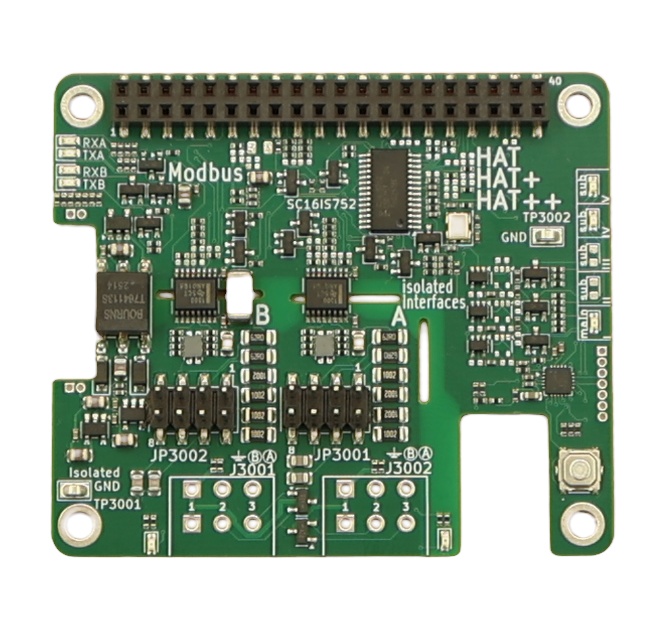
Overview
The BE-IIS-HPP-MODBUS provides two independent, galvanically isolated RS-485 interfaces. It is intended for Modbus RTU systems as well as other serial protocols that use a differential RS-485 physical layer.
Automatic direction handling reduces application effort for half-duplex operation. The two channels make the HAT suitable for gateways between serial field devices or for simultaneous monitoring and communication tasks.
Linux integration
The board is integrated through a product-specific HAT++ configuration. The installer includes the Device Tree overlay and the required setup components for the selected instance.
Once configured, each port is exposed as a regular Linux serial device. Applications can use standard serial APIs and Modbus software without a proprietary runtime.
RS-485 operation
Configure the serial settings to match the attached network: baud rate, data bits, parity and stop bits must be identical at all participants.
RS-485 is a bus. Use a linear topology, avoid uncontrolled stubs and apply termination where required by the cable length and transmission speed.
Set the Modbus RTU baud rate
Set the serial framing before starting a Modbus application. All devices on the RS-485 segment must use the same baud rate, data bits, parity and stop bits.
Example: 115200 bit/s, 8 data bits, no parity and one stop bit:
sudo stty -F /dev/ttySC0 115200 cs8 -cstopb -parenb raw -echo
stty -F /dev/ttySC0 -a
For 9600 bit/s with even parity, use:
sudo stty -F /dev/ttySC0 9600 cs8 -cstopb parenb -parodd raw -echo
Use the same device and serial settings in the Modbus RTU master or slave application.
Integration notes
The board is intended for isolated industrial communication. The cable shield, reference strategy and termination must still be planned as part of the complete installation.
Serial-port check
After the overlay has been applied, first inspect the UART devices created by the SC16IS752 driver. The exact ttySC* number depends on the active HAT++ instance and other installed serial hardware.
ls -l /dev/ttySC*
stty -F /dev/ttySC0 115200 cs8 -cstopb -parenb raw -echo
Use the selected device path in a Modbus RTU master or slave application. Both channels must be configured with the same serial framing as the connected RS-485 bus.